 Deburst
Photo cleaner for iPhone, iPad and AndroidRing the keepers.Cross out the rest.
Deburst finds the duplicate and similar photos, bursts, blurry shots, old screenshots and oversized videos that fill your phone. It suggests what to keep. You make the marks, and nothing is deleted until you confirm.
- Coming soon to the App Store
- Coming soon to Google Play
Your first scan is free to clean. No account, no upload.





How it works
Four steps, and the last two exist so that nothing goes by accident.
Scan
Deburst reads your library on the device and gives each photo a small signature. A later scan only reads what is new.
Land on Tools
Everything it found is on one page: similar shots, screenshots, blurry photos, large videos and dozens more tools, each with what it found and how much space that is.
Mark
Open a tool. The best frame of each shot is already ringed and the rest are crossed out. Tap a print to change a mark, the way a photographer marks a contact sheet.
Last look, then delete
Last look shows everything you crossed out in one place. Then your phone asks in its own dialog, and deleted photos go to Recently Deleted on iPhone or the Trash on Android.
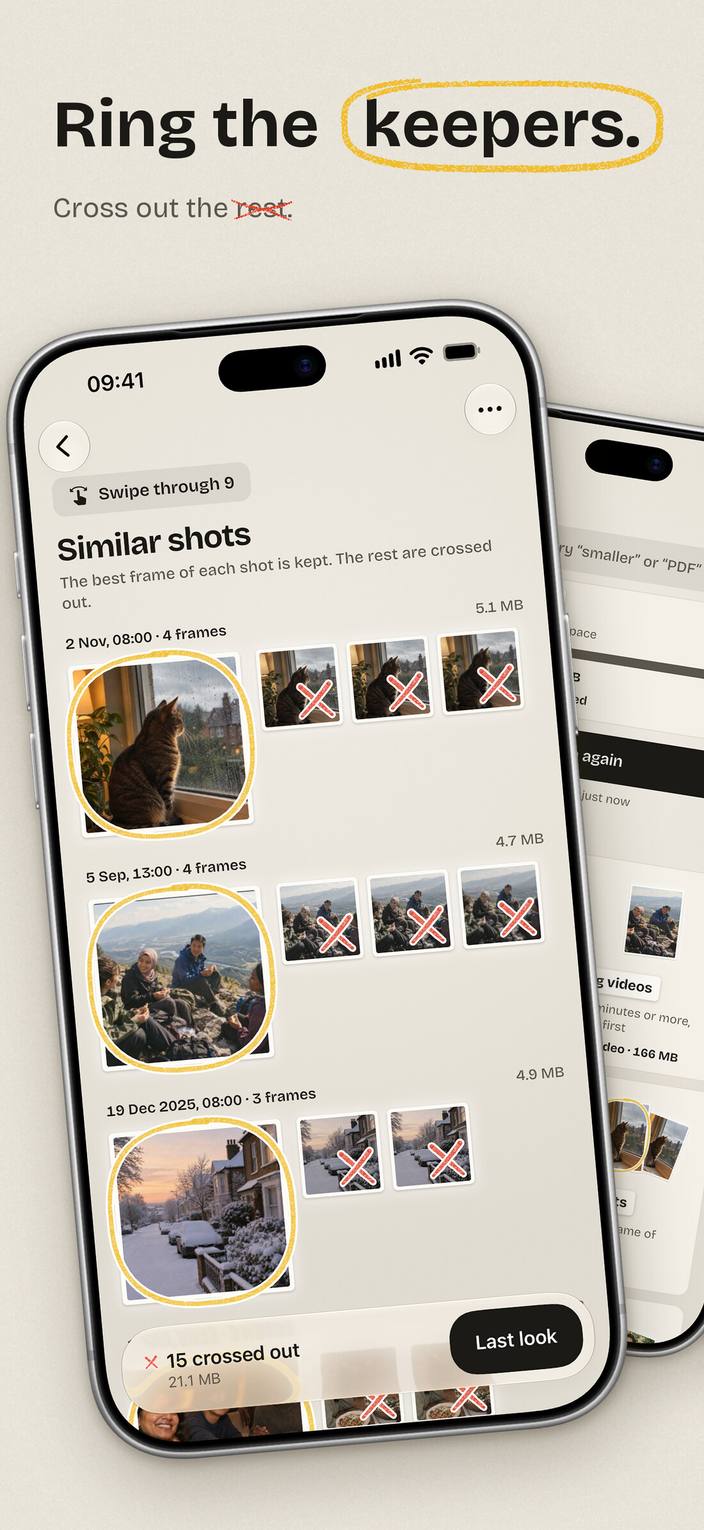
A decision is a mark on the print
This is Similar shots in the app. Each row is one moment: the date, the number of frames and the space they take. The frame Deburst suggests keeping is printed large and ringed in yellow. The others carry a red cross.
Nothing here is hidden behind a "smart clean" button. The suggestion is drawn on your photos where you can see it and change it.
- A bulk action never crosses out the last copy of a group.
- Photos you ring are remembered and not asked about again.
- Swipe through shows one print at a time if you prefer.
What it cleans
Each of these has its own page with the details: what is found, how, and what is left alone.

Duplicate photos
Exact copies and re-saves, found wherever they sit in your library.

Similar photos
Six tries at the same sunset. Keep the best frame of each shot.

Burst photos
Hold the shutter, get thirty frames. Pick one.

Blurry photos
Out-of-focus shots, side by side, softest first.

Screenshots
Tickets, maps and chats you needed for one afternoon.

WhatsApp photos
Memes, forwards and good-morning pictures your chats saved for you.

Large videos
The biggest files first. A handful of them is most of your storage.
Compress videos
Same videos, less space. Keeps the date, the place and the album.

Compress photos
Same photos, less space, at full resolution.

Live Photos
Keep the photo, drop the clip. iPhone and iPad.
Your photos stay on your phone
Deburst compares your photos on the device, through the photo library your phone already has. There is no server that receives photos.
- No upload
- Photos, thumbnails and the signatures made from them never leave your device.
- No account
- There is nothing to sign up for and nothing to sign in to.
- No ads, no tracking
- No ad network, no advertising identifier and no analytics SDK in the app.
- What does leave
- Only purchase information, to show plans and confirm what you bought, through the App Store or Google Play and RevenueCat.
The first scan is free to clean
Everything your first scan finds can be marked and deleted for free, however long you take. After that, looking stays free; marking and deleting need a one-pile clean or a plan. No trials, no countdowns.
One pile clean
$0.99 one time
Weekly
$1.49 / a week
Monthly
$3.99 / a month
Yearly
$19.99 / a year
Prices shown are the US prices. The App Store or Google Play shows the price for your country before you buy, and local taxes may apply.
Questions people ask first
Is Deburst free?
Your first scan is fully free to clean: every pile it finds can be marked and deleted. After that you can still scan and look at everything for free, and marking and deleting need a one-pile clean or a weekly, monthly or yearly plan. There are no free trials that turn into a charge.
Does Deburst upload my photos?
No. Photos are read and compared on your device. Deburst has no account system and no server that receives photos. The only thing that leaves your device is purchase information.
Can it delete photos without asking me?
No. Deburst suggests marks, you change them as you like, and nothing is deleted before the Last look and the delete dialog your phone shows.
Can I recover something I deleted?
On iPhone and iPad, deleted photos go to Recently Deleted in Photos for about 30 days. On Android 11 or later they go to your gallery's Trash for a limited time. On Android 10 or older a delete is permanent, and Deburst says so before you confirm.
Which devices does it run on?
iPhone, iPad and Android phones and tablets. A few tools depend on things only Apple devices record, such as Live Photos, and appear only there.
When can I download it?
Deburst is not on the stores yet. It is coming to the App Store and Google Play.
Clean the first pile today
The first scan is free to clean, and it takes a few minutes.
- Coming soon to the App Store
- Coming soon to Google Play